Connect your GitHub account to the GEOly Agent, choose which repositories it can use, and let it read code and open issues or draft pull requests for the changes it suggests.
The GitHub connector lets the GEOly Agent work in your repositories. It can read issues, pull requests, and code, and it can turn the structured data, FAQ, and llms.txt changes it suggests into issues or draft pull requests for you to review and merge.Connecting takes two steps on GitHub: you authorize the GEOly Agent app, then you choose the repositories it may use. GEOly opens both pages for you, one after the other.
Before you start
Make sure that:
You can open Agent in GEOly. Connectors live on the Agent’s Connectors page.
You can sign in to the GitHub account you want to connect.
To use repositories that belong to a GitHub organization, you are an owner of that organization, or an owner can approve the installation for you.
Each connection uses your own GitHub login. Other people in your GEOly organization can’t use it. The agent can read any public repository, but it can only write to, or read private code in, repositories that your GitHub account can access and that you selected for the app.
Step 1: Open GitHub on the Connectors page
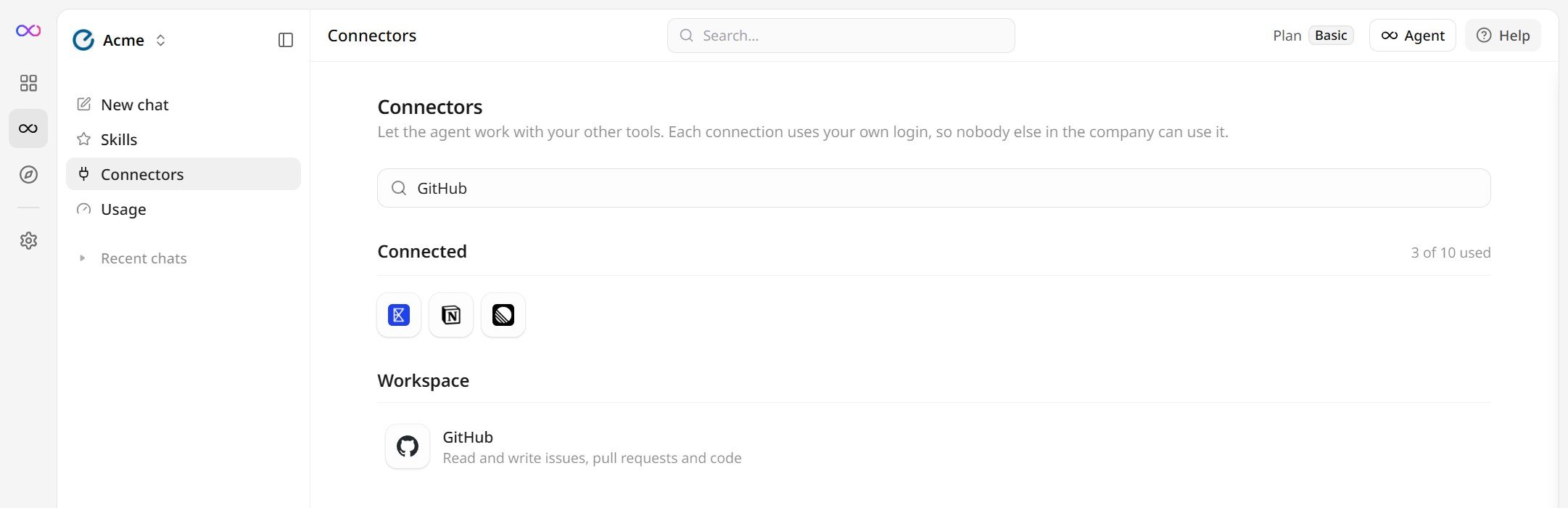
In GEOly, open Agent, then click Connectors in the sidebar. You can also open app.geoly.ai/agent/connectors directly.
Find GitHub in the Workspace group, or type GitHub in the search box, and click it.
Step 2: Set up the connection
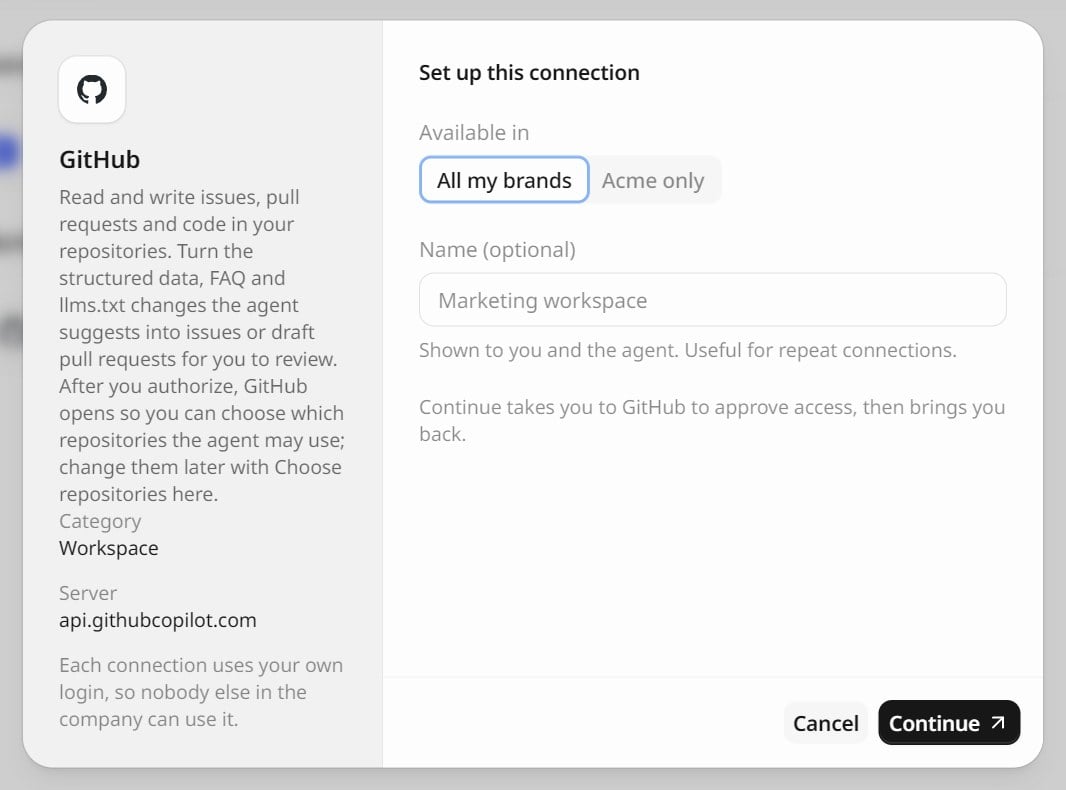
Under Available in, choose All my brands to make the connection available in every project, or limit it to the project you’re working on.
Optionally enter a Name, such as Company GitHub. It helps when you connect more than one GitHub account.
Click Continue. GEOly takes you to GitHub.
Step 3: Authorize GEOly Agent
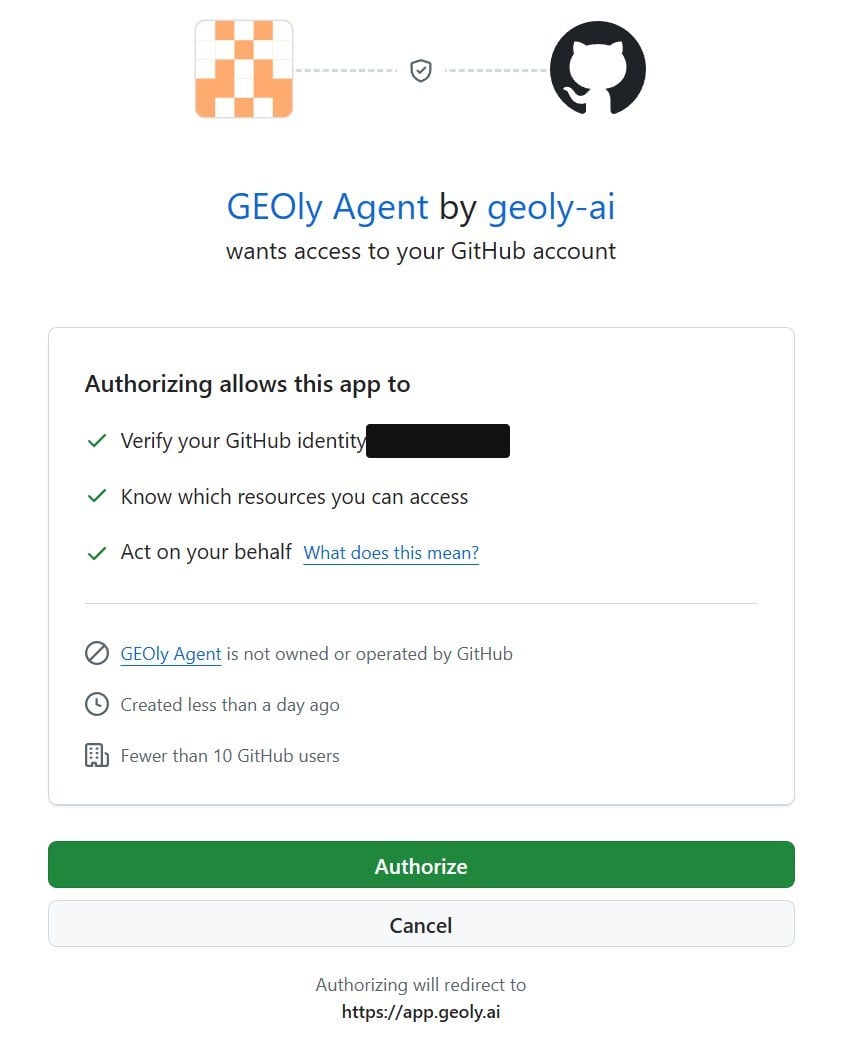
GitHub shows Authorize GEOly Agent. Check that the account named on the page is the one you want to connect, then click Authorize.Authorizing lets GEOly act as you on GitHub. Beyond reading public repositories, it can only work in the repositories you choose in the next step. It does not give GEOly your GitHub password.
Step 4: Choose repositories
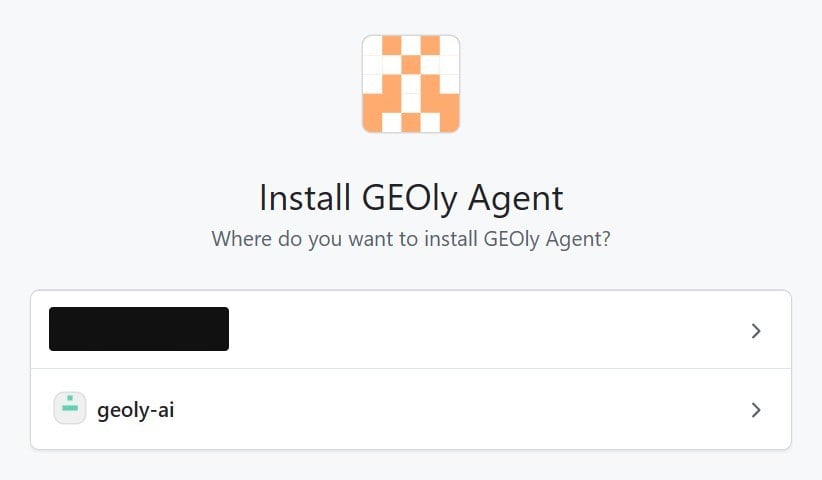
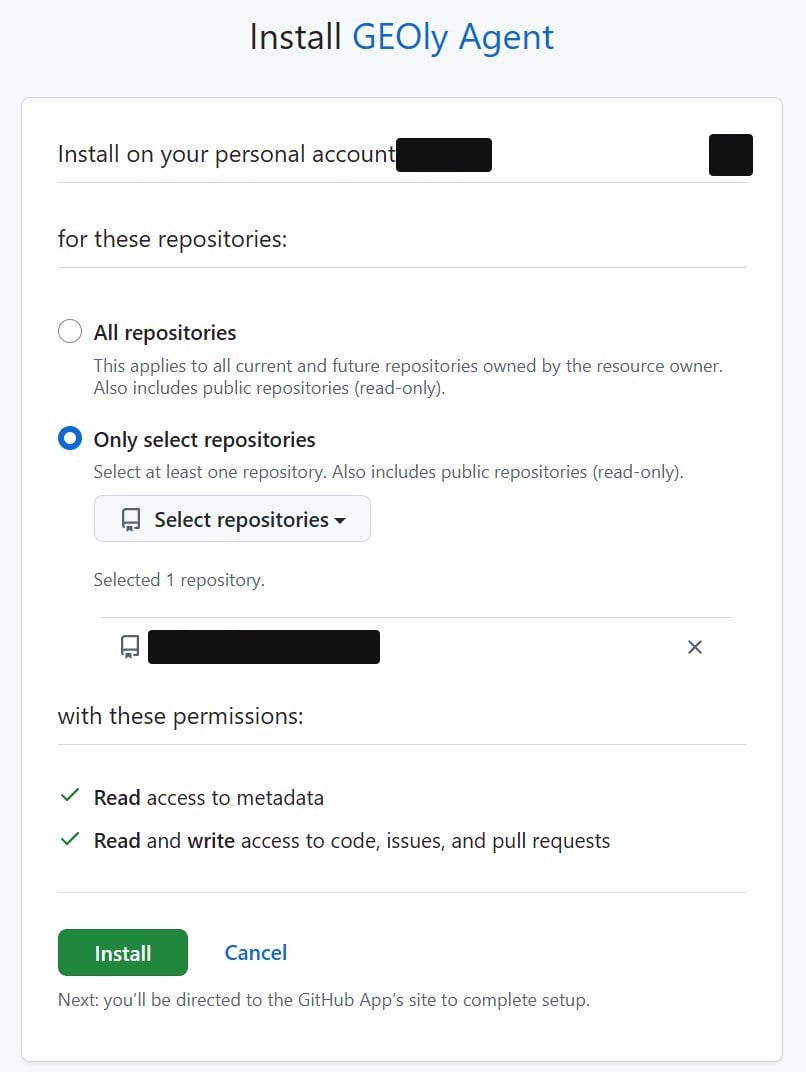
Right after you authorize, GitHub opens Install GEOly Agent.
Choose where to install the app: your personal account or an organization. If you see more than one account, pick the one that owns the repositories you want the agent to use.
Under Repository access, choose Only select repositories and pick the repositories the agent may use. We recommend this over All repositories.
Check the permissions: Read access to metadata and Read and write access to code, issues, and pull requests. Then click Install.
GitHub then brings you back to the GEOly Connectors page, and GitHub appears under Connected.If you aren’t an owner of the organization, GitHub shows Request instead of Install and sends the request to the organization’s owners. GEOly then shows “Request sent. The agent can use it once an organization owner approves.” The repositories become available as soon as an owner approves; you don’t need to connect again.
Don’t skip this step. Until the app is installed on a repository, the agent can only read public repositories, and private repositories look as if they don’t exist. If you closed the GitHub page early, open the connection in GEOly and click Choose repositories (see below).
Change repositories later
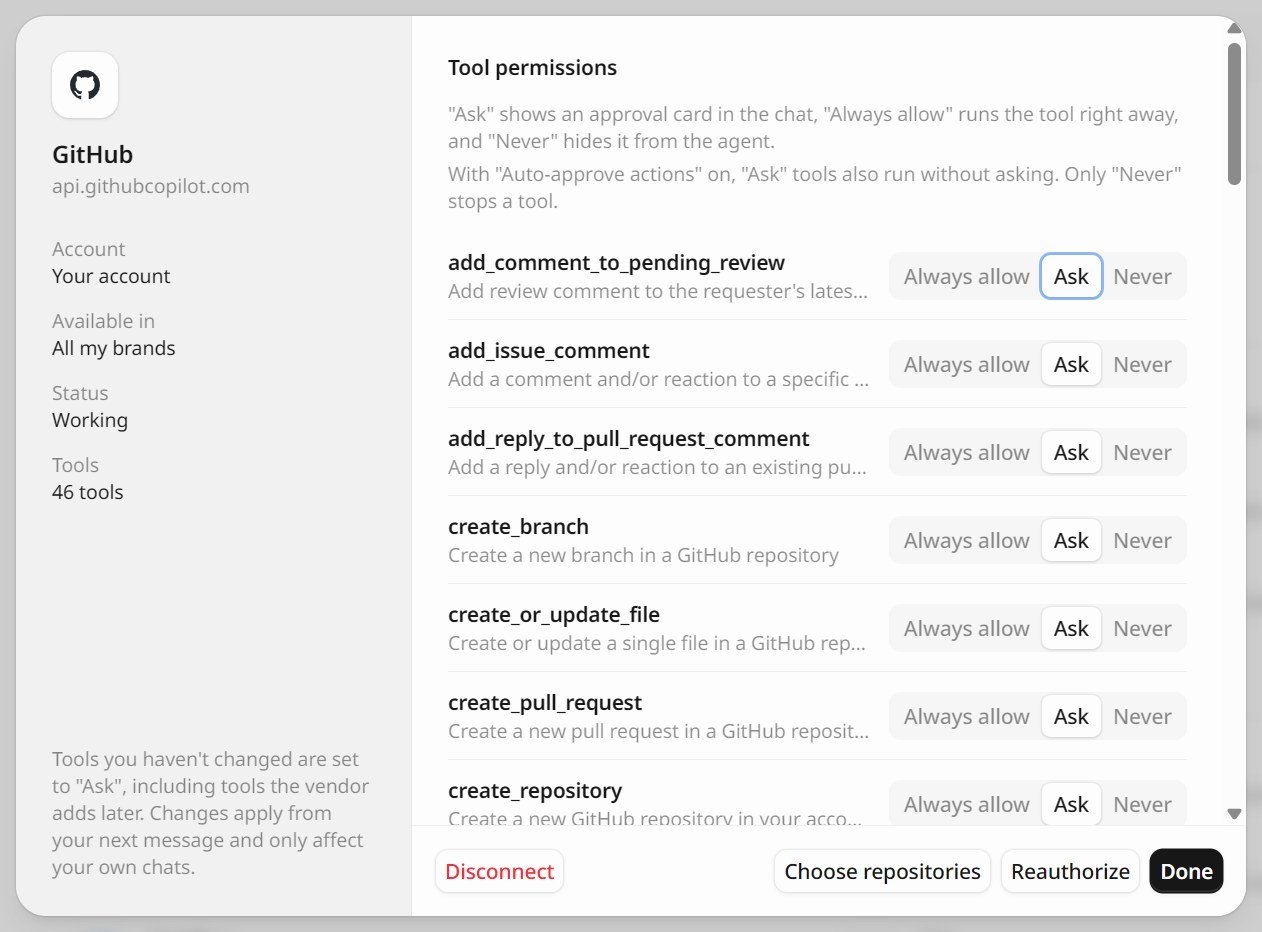
On the Connectors page, click your GitHub connection under Connected, then click Choose repositories at the bottom of the dialog. GitHub opens the same page as in step 4, where you can add or remove repositories. When you’re done, GitHub brings you back to GEOly.You can also change this on GitHub: open Settings → Applications → Installed GitHub Apps, then click Configure next to GEOly Agent. For an organization, open the organization’s settings instead.
Use GitHub in a chat
Start a new chat with the agent and name the repository, for example:
“List the open issues in acme/website that mention structured data.”
“Open a draft pull request in acme/website that adds the FAQ schema we just wrote to the shipping page.”
“Create an issue in acme/website for each page that is missing a meta description.”
By default, every GitHub tool is set to Ask. Before the agent runs one, a card in the chat shows what it is about to do, and nothing happens until you approve it. To change this per tool, open the connection dialog and set each tool to Always allow, Ask, or Never. With Auto-approve actions on, Ask tools also run without asking; only Never stops a tool.
Disconnect
Open the connection dialog and click Disconnect. This deletes the copy of the authorization that GEOly keeps. To remove the app from GitHub as well:
Settings → Applications → Authorized GitHub Apps: click Revoke next to GEOly Agent.
Settings → Applications → Installed GitHub Apps: click Configure next to GEOly Agent, then Uninstall. Do the same in each organization where you installed it.
Troubleshooting
The agent says it can’t find a repository (for example, “Could not resolve to a Repository”): the app isn’t installed on that repository, or you typed the wrong owner or name. Click Choose repositories in the connection dialog and add the repository.
An organization’s repositories are missing: the app isn’t installed on that organization yet, or an organization owner hasn’t approved the installation. Ask an owner to approve it on GitHub.
The connection shows “Needs reauthorization”: GitHub access expires every 8 hours, and GEOly renews it automatically. Renewal stops working if you revoked the app on GitHub or haven’t used the connection for about six months. Click Reauthorize in the connection dialog; you don’t need to choose repositories again.
“Access was cancelled on the GitHub side”: you clicked Cancel on GitHub’s authorization page. Start again from step 1.
{"docsConfig":{"theme":"mint","$schema":"https://mintlify.com/docs.json","name":"GEOly Docs","colors":{"primary":"#0A0A0A","light":"#FAFAFA","dark":"#0A0A0A"},"logo":{"light":"https://mintcdn.com/ge-oly/p0_3CDFFgQCZHdCi/logo/light.svg?fit=max\u0026auto=format\u0026n=p0_3CDFFgQCZHdCi\u0026q=85\u0026s=0edb563f71e6c47cc3d1dba3e035d58d","dark":"https://mintcdn.com/ge-oly/p0_3CDFFgQCZHdCi/logo/dark.svg?fit=max\u0026auto=format\u0026n=p0_3CDFFgQCZHdCi\u0026q=85\u0026s=f4c0befcd2abb2eeee7170e9d0b7feb4","href":"https://www.geoly.ai"},"favicon":"https://mintcdn.com/ge-oly/p0_3CDFFgQCZHdCi/favicon.svg?fit=max\u0026auto=format\u0026n=p0_3CDFFgQCZHdCi\u0026q=85\u0026s=8e5a98f92030af1fa8c2e4d06db588c3","api":{"playground":{"display":"interactive"},"examples":{"defaults":"required","languages":["curl","python","javascript"]}},"navbar":{"links":[{"href":"https://www.geoly.ai/blog","label":"Blog"},{"href":"https://www.geoly.ai/pricing","label":"Pricing"}],"primary":{"type":"button","label":"Sign in","href":"https://app.geoly.ai"}},"footer":{"socials":{"website":"https://www.geoly.ai"}},"icons":{"library":"lucide"},"contextual":{"options":["copy","view","chatgpt","claude","perplexity","mcp","cursor","vscode"],"display":"header"},"styling":{"latex":false},"navigation":{"languages":[{"language":"en","href":""},{"language":"zh","href":"zh"}]}},"deployment":{"deploymentMetadataValue":{"subdomain":"ge-oly","hasAudioNarration":false,"actualSubdomain":"ge-oly","customDomains":["docs.geoly.ai"],"gitSource":{"type":"github","owner":"geoly-ai","repo":"geoly-web-docs","deployBranch":"main","contentDirectory":"","isPrivate":false,"mountPath":"","label":"","_id":"6ae8442a0b211b76a285b925"},"entitlements":{"AI_CHAT":{"status":"DISABLED"},"WEB_MCP":{"status":"DISABLED"},"NARRATION":{"status":"DISABLED"}},"buildId":"6afc4f1370e6e056bd1c3ff1","clientVersion":"0.0.4271","searchFilterCounts":[{"language":"zh","tag":"文档","count":23},{"language":"en","tag":"API Reference","count":18},{"language":"zh","tag":"API Reference","count":18},{"language":"en","tag":"Documentation","count":17},{"language":"en","tag":"MCP Server","count":11},{"language":"zh","tag":"MCP Server","count":11},{"language":"en","tag":"Reports","count":6},{"language":"zh","tag":"洞察","count":6},{"language":"zh","tag":"报表","count":6},{"language":"en","tag":"Records","count":5},{"language":"zh","tag":"监测记录","count":5},{"language":"en","tag":"Catalog","count":4},{"language":"en","tag":"Get started","count":4},{"language":"zh","tag":"监测","count":4},{"language":"zh","tag":"目录","count":4},{"language":"zh","tag":"入门","count":4},{"language":"en","tag":"Insights","count":3},{"language":"en","tag":"Monitoring","count":3},{"language":"en","tag":"Integrations","count":3},{"language":"zh","tag":"集成","count":3}]},"assistantConfig":{"enableAskAiButton":false,"enableStarterQuestions":false,"enableContextualStarterQuestions":false,"enableAskAiSearchBar":true},"basePath":"","hasChatPermissions":false,"hasWebMcpPermissions":false,"toggles":[{"name":"kill-isr","enabled":true,"variant":{"name":"disabled","enabled":false,"feature_enabled":true},"impressionData":false},{"name":"custom-rbac-roles","enabled":true,"variant":{"name":"disabled","enabled":false,"feature_enabled":true},"impressionData":false},{"name":"agent-mintlify-slack","enabled":true,"variant":{"name":"disabled","enabled":false,"feature_enabled":true},"impressionData":false},{"name":"agent-integrations-settings","enabled":true,"variant":{"name":"disabled","enabled":false,"feature_enabled":true},"impressionData":false},{"name":"rbac-expansion","enabled":true,"variant":{"name":"disabled","enabled":false,"feature_enabled":true},"impressionData":false},{"name":"automations-pr-grouping","enabled":true,"variant":{"name":"disabled","enabled":false,"feature_enabled":true},"impressionData":false},{"name":"custom-prefix","enabled":true,"variant":{"name":"disabled","enabled":false,"feature_enabled":true},"impressionData":false},{"name":"analytics-v7","enabled":true,"variant":{"name":"disabled","enabled":false,"feature_enabled":true},"impressionData":false},{"name":"user-flows-analytics","enabled":true,"variant":{"name":"disabled","enabled":false,"feature_enabled":true},"impressionData":false},{"name":"no-publish-flow","enabled":true,"variant":{"name":"disabled","enabled":false,"feature_enabled":true},"impressionData":false},{"name":"workos-onboarding","enabled":true,"variant":{"name":"disabled","enabled":false,"feature_enabled":true},"impressionData":false},{"name":"snapshot-serving-live","enabled":true,"variant":{"name":"disabled","enabled":false,"feature_enabled":true},"impressionData":false},{"name":"stripTemperatureMiddleware","enabled":true,"variant":{"name":"disabled","enabled":false,"feature_enabled":true},"impressionData":false},{"name":"support-platform-pylon-zendesk","enabled":true,"variant":{"name":"disabled","enabled":false,"feature_enabled":true},"impressionData":false},{"name":"snapshot-serving","enabled":true,"variant":{"name":"disabled","enabled":false,"feature_enabled":true},"impressionData":false},{"name":"instant-rollback","enabled":true,"variant":{"name":"disabled","enabled":false,"feature_enabled":true},"impressionData":false},{"name":"granular-notifications-server","enabled":true,"variant":{"name":"disabled","enabled":false,"feature_enabled":true},"impressionData":false},{"name":"granular-notifications","enabled":true,"variant":{"name":"disabled","enabled":false,"feature_enabled":true},"impressionData":false},{"name":"automations-fable","enabled":true,"variant":{"name":"disabled","enabled":false,"feature_enabled":true},"impressionData":false},{"name":"fixed-ai-action-pricing","enabled":true,"variant":{"name":"disabled","enabled":false,"feature_enabled":true},"impressionData":false},{"name":"site-roles","enabled":true,"variant":{"name":"disabled","enabled":false,"feature_enabled":true},"impressionData":false},{"name":"automation-resolve-merge-conflict","enabled":true,"variant":{"name":"disabled","enabled":false,"feature_enabled":true},"impressionData":false},{"name":"scoped-publishing","enabled":true,"variant":{"name":"disabled","enabled":false,"feature_enabled":true},"impressionData":false},{"name":"mintql","enabled":true,"variant":{"name":"disabled","enabled":false,"feature_enabled":true},"impressionData":false},{"name":"page-level-analytics","enabled":true,"variant":{"name":"disabled","enabled":false,"feature_enabled":true},"impressionData":false},{"name":"editor-version-history-v2","enabled":true,"variant":{"name":"disabled","enabled":false,"feature_enabled":true},"impressionData":false},{"name":"billing-page-v2","enabled":true,"variant":{"name":"disabled","enabled":false,"feature_enabled":true},"impressionData":false},{"name":"full-page-search","enabled":true,"variant":{"name":"disabled","enabled":false,"feature_enabled":true},"impressionData":false},{"name":"workspace-projects","enabled":true,"variant":{"name":"disabled","enabled":false,"feature_enabled":true},"impressionData":false},{"name":"assistant-v5","enabled":true,"variant":{"name":"disabled","enabled":false,"feature_enabled":true},"impressionData":false},{"name":"fork-pr-previews","enabled":true,"variant":{"name":"disabled","enabled":false,"feature_enabled":true},"impressionData":false},{"name":"revalidation-jwt","enabled":true,"variant":{"name":"disabled","enabled":false,"feature_enabled":true},"impressionData":false},{"name":"workos-sso-scim","enabled":true,"variant":{"name":"disabled","enabled":false,"feature_enabled":true},"impressionData":false},{"name":"hobby-abuse-scan","enabled":true,"variant":{"name":"disabled","enabled":false,"feature_enabled":true},"impressionData":false},{"name":"dashboard-inbox","enabled":true,"variant":{"name":"disabled","enabled":false,"feature_enabled":true},"impressionData":false},{"name":"workos-signup","enabled":true,"variant":{"name":"disabled","enabled":false,"feature_enabled":true},"impressionData":false},{"name":"turbopuffer-dual-write","enabled":true,"variant":{"name":"disabled","enabled":false,"feature_enabled":true},"impressionData":false},{"name":"workos-enabled","enabled":true,"variant":{"name":"disabled","enabled":false,"feature_enabled":true},"impressionData":false},{"name":"approve-review-flow","enabled":true,"variant":{"name":"disabled","enabled":false,"feature_enabled":true},"impressionData":false},{"name":"editor-metadata","enabled":true,"variant":{"name":"disabled","enabled":false,"feature_enabled":true},"impressionData":false},{"name":"sso-setup-deadline-banner","enabled":true,"variant":{"name":"disabled","enabled":false,"feature_enabled":true},"impressionData":false},{"name":"turbopuffer-serve","enabled":true,"variant":{"name":"disabled","enabled":false,"feature_enabled":true},"impressionData":false},{"name":"live-agents","enabled":true,"variant":{"name":"disabled","enabled":false,"feature_enabled":true},"impressionData":false},{"name":"starter-pricing","enabled":true,"variant":{"name":"control","enabled":true,"payload":{"type":"string","value":"control"},"feature_enabled":true},"impressionData":false},{"name":"llms-txt-v2","enabled":true,"variant":{"name":"disabled","enabled":false,"feature_enabled":true},"impressionData":false},{"name":"wildcard-email-auth","enabled":true,"variant":{"name":"disabled","enabled":false,"feature_enabled":true},"impressionData":false}],"googleFontsInlined":false},"customCss":[]}
{"page":{"pagePath":"integrations/github-connector","slug":"/integrations/github-connector","pageMetadata":{"title":"Connect GitHub to the GEOly Agent","description":"Connect your GitHub account to the GEOly Agent, choose which repositories it can use, and let it read code and open issues or draft pull requests for the changes it suggests.","href":"/integrations/github-connector"},"description":{"compiledSource":"\"use strict\";\nconst {jsx: _jsx} = arguments[0];\nconst {useMDXComponents: _provideComponents} = arguments[0];\nfunction _createMdxContent(props) {\n const _components = {\n p: \"p\",\n ..._provideComponents(),\n ...props.components\n };\n return _jsx(_components.p, {\n children: \"Connect your GitHub account to the GEOly Agent, choose which repositories it can use, and let it read code and open issues or draft pull requests for the changes it suggests.\"\n });\n}\nfunction MDXContent(props = {}) {\n const {wrapper: MDXLayout} = {\n ..._provideComponents(),\n ...props.components\n };\n return MDXLayout ? _jsx(MDXLayout, {\n ...props,\n children: _jsx(_createMdxContent, {\n ...props\n })\n }) : _createMdxContent(props);\n}\nreturn {\n default: MDXContent\n};\n","frontmatter":{},"scope":{}},"pageType":"default","mdx":{"mdxSource":{"compiledSource":"\"use strict\";const{Fragment:_Fragment,jsx:_jsx,jsxs:_jsxs}=arguments[0];const{useMDXComponents:_provideComponents}=arguments[0];function _createMdxContent(props){const _components={code:`code`,li:`li`,ol:`ol`,p:`p`,strong:`strong`,ul:`ul`,..._provideComponents(),...props.components},{Heading,OptimizedImage,Warning}=_components;if(!Heading)_missingMdxReference(`Heading`,true);if(!OptimizedImage)_missingMdxReference(`OptimizedImage`,true);if(!Warning)_missingMdxReference(`Warning`,true);return _jsxs(_Fragment,{children:[_jsxs(_components.p,{children:[`The GitHub connector lets the GEOly Agent work in your repositories. It can read issues, pull requests, and code, and it can turn the structured data, FAQ, and `,_jsx(_components.code,{children:`llms.txt`}),` changes it suggests into issues or draft pull requests for you to review and merge.`]}),`\n`,_jsxs(_components.p,{children:[`Connecting takes two steps on GitHub: you `,_jsx(_components.strong,{children:`authorize`}),` the GEOly Agent app, then you `,_jsx(_components.strong,{children:`choose the repositories`}),` it may use. GEOly opens both pages for you, one after the other.`]}),`\n`,_jsx(Heading,{level:`2`,id:`before-you-start`,children:`Before you start`}),`\n`,_jsx(_components.p,{children:`Make sure that:`}),`\n`,_jsxs(_components.ul,{children:[`\n`,_jsxs(_components.li,{children:[`You can open `,_jsx(_components.strong,{children:`Agent`}),` in GEOly. Connectors live on the Agent’s `,_jsx(_components.strong,{children:`Connectors`}),` page.`]}),`\n`,_jsx(_components.li,{children:`You can sign in to the GitHub account you want to connect.`}),`\n`,_jsx(_components.li,{children:`To use repositories that belong to a GitHub organization, you are an owner of that organization, or an owner can approve the installation for you.`}),`\n`]}),`\n`,_jsx(_components.p,{children:`Each connection uses your own GitHub login. Other people in your GEOly organization can’t use it. The agent can read any public repository, but it can only write to, or read private code in, repositories that your GitHub account can access and that you selected for the app.`}),`\n`,_jsx(Heading,{level:`2`,id:`step-1-open-github-on-the-connectors-page`,children:`Step 1: Open GitHub on the Connectors page`}),`\n`,_jsxs(_components.ol,{children:[`\n`,_jsxs(_components.li,{children:[`In GEOly, open `,_jsx(_components.strong,{children:`Agent`}),`, then click `,_jsx(_components.strong,{children:`Connectors`}),` in the sidebar. You can also open `,_jsx(_components.code,{children:`app.geoly.ai/agent/connectors`}),` directly.`]}),`\n`,_jsxs(_components.li,{children:[`Find `,_jsx(_components.strong,{children:`GitHub`}),` in the `,_jsx(_components.strong,{children:`Workspace`}),` group, or type `,_jsx(_components.code,{children:`GitHub`}),` in the search box, and click it.`]}),`\n`]}),`\n`,_jsx(OptimizedImage,{src:`https://mintcdn.com/ge-oly/-bSGJjlZI96mAE5b/images/github-connector/en-01-connectors.jpg?fit=max\u0026auto=format\u0026n=-bSGJjlZI96mAE5b\u0026q=85\u0026s=a1555b0b4b2fdc79fb4bdb14cba0425c`,alt:`The Connectors page with GitHub in the Workspace group`,\"data-og-width\":`2162`,width:`2162`,\"data-og-height\":`700`,height:`700`,\"data-path\":`images/github-connector/en-01-connectors.jpg`,\"data-optimize\":`true`,\"data-opv\":`3`,srcset:`https://mintcdn.com/ge-oly/-bSGJjlZI96mAE5b/images/github-connector/en-01-connectors.jpg?w=280\u0026fit=max\u0026auto=format\u0026n=-bSGJjlZI96mAE5b\u0026q=85\u0026s=37126462e6f7ad6bba1a884e5880eebf 280w, https://mintcdn.com/ge-oly/-bSGJjlZI96mAE5b/images/github-connector/en-01-connectors.jpg?w=560\u0026fit=max\u0026auto=format\u0026n=-bSGJjlZI96mAE5b\u0026q=85\u0026s=e6409257232f463853a12dbfcf4a1bf4 560w, https://mintcdn.com/ge-oly/-bSGJjlZI96mAE5b/images/github-connector/en-01-connectors.jpg?w=840\u0026fit=max\u0026auto=format\u0026n=-bSGJjlZI96mAE5b\u0026q=85\u0026s=75d583e92be89b6040dff3628bad8621 840w, https://mintcdn.com/ge-oly/-bSGJjlZI96mAE5b/images/github-connector/en-01-connectors.jpg?w=1100\u0026fit=max\u0026auto=format\u0026n=-bSGJjlZI96mAE5b\u0026q=85\u0026s=0ce1fa7b682e26085d226bed76789da5 1100w, https://mintcdn.com/ge-oly/-bSGJjlZI96mAE5b/images/github-connector/en-01-connectors.jpg?w=1650\u0026fit=max\u0026auto=format\u0026n=-bSGJjlZI96mAE5b\u0026q=85\u0026s=a419e03f4941c975bccbc2dcdc27c059 1650w, https://mintcdn.com/ge-oly/-bSGJjlZI96mAE5b/images/github-connector/en-01-connectors.jpg?w=2500\u0026fit=max\u0026auto=format\u0026n=-bSGJjlZI96mAE5b\u0026q=85\u0026s=1509a8a099c781bb4cdbfdc9b17bdecf 2500w`}),`\n`,_jsx(Heading,{level:`2`,id:`step-2-set-up-the-connection`,children:`Step 2: Set up the connection`}),`\n`,_jsxs(_components.ol,{children:[`\n`,_jsxs(_components.li,{children:[`Under `,_jsx(_components.strong,{children:`Available in`}),`, choose `,_jsx(_components.strong,{children:`All my brands`}),` to make the connection available in every project, or limit it to the project you’re working on.`]}),`\n`,_jsxs(_components.li,{children:[`Optionally enter a `,_jsx(_components.strong,{children:`Name`}),`, such as `,_jsx(_components.code,{children:`Company GitHub`}),`. It helps when you connect more than one GitHub account.`]}),`\n`,_jsxs(_components.li,{children:[`Click `,_jsx(_components.strong,{children:`Continue`}),`. GEOly takes you to GitHub.`]}),`\n`]}),`\n`,_jsx(OptimizedImage,{src:`https://mintcdn.com/ge-oly/-bSGJjlZI96mAE5b/images/github-connector/en-02-setup.jpg?fit=max\u0026auto=format\u0026n=-bSGJjlZI96mAE5b\u0026q=85\u0026s=674b00d641a49f8fa87ab3fec6dec279`,alt:`The Set up this connection dialog for GitHub`,\"data-og-width\":`1066`,width:`1066`,\"data-og-height\":`790`,height:`790`,\"data-path\":`images/github-connector/en-02-setup.jpg`,\"data-optimize\":`true`,\"data-opv\":`3`,srcset:`https://mintcdn.com/ge-oly/-bSGJjlZI96mAE5b/images/github-connector/en-02-setup.jpg?w=280\u0026fit=max\u0026auto=format\u0026n=-bSGJjlZI96mAE5b\u0026q=85\u0026s=365d529972cca9659648df9e61d1a5ae 280w, https://mintcdn.com/ge-oly/-bSGJjlZI96mAE5b/images/github-connector/en-02-setup.jpg?w=560\u0026fit=max\u0026auto=format\u0026n=-bSGJjlZI96mAE5b\u0026q=85\u0026s=9214077dcc91fac4878265bde88db756 560w, https://mintcdn.com/ge-oly/-bSGJjlZI96mAE5b/images/github-connector/en-02-setup.jpg?w=840\u0026fit=max\u0026auto=format\u0026n=-bSGJjlZI96mAE5b\u0026q=85\u0026s=9a922bd613b66a3a390fd3b5f5bfe629 840w, https://mintcdn.com/ge-oly/-bSGJjlZI96mAE5b/images/github-connector/en-02-setup.jpg?w=1100\u0026fit=max\u0026auto=format\u0026n=-bSGJjlZI96mAE5b\u0026q=85\u0026s=ffec4e29b12103951c4cd8aebb6c24cd 1100w, https://mintcdn.com/ge-oly/-bSGJjlZI96mAE5b/images/github-connector/en-02-setup.jpg?w=1650\u0026fit=max\u0026auto=format\u0026n=-bSGJjlZI96mAE5b\u0026q=85\u0026s=78133363e95143986ce86cc8e5c9edac 1650w, https://mintcdn.com/ge-oly/-bSGJjlZI96mAE5b/images/github-connector/en-02-setup.jpg?w=2500\u0026fit=max\u0026auto=format\u0026n=-bSGJjlZI96mAE5b\u0026q=85\u0026s=7742e6e98cbd860daa6a446f7e43fb81 2500w`}),`\n`,_jsx(Heading,{level:`2`,id:`step-3-authorize-geoly-agent`,children:`Step 3: Authorize GEOly Agent`}),`\n`,_jsxs(_components.p,{children:[`GitHub shows `,_jsx(_components.strong,{children:`Authorize GEOly Agent`}),`. Check that the account named on the page is the one you want to connect, then click `,_jsx(_components.strong,{children:`Authorize`}),`.`]}),`\n`,_jsx(OptimizedImage,{src:`https://mintcdn.com/ge-oly/-bSGJjlZI96mAE5b/images/github-connector/en-03-authorize.jpg?fit=max\u0026auto=format\u0026n=-bSGJjlZI96mAE5b\u0026q=85\u0026s=dc9fe9cb2829859c3b70ab39e16a5665`,alt:`GitHub's Authorize GEOly Agent page`,\"data-og-width\":`842`,width:`842`,\"data-og-height\":`1050`,height:`1050`,\"data-path\":`images/github-connector/en-03-authorize.jpg`,\"data-optimize\":`true`,\"data-opv\":`3`,srcset:`https://mintcdn.com/ge-oly/-bSGJjlZI96mAE5b/images/github-connector/en-03-authorize.jpg?w=280\u0026fit=max\u0026auto=format\u0026n=-bSGJjlZI96mAE5b\u0026q=85\u0026s=29b5ce39a48e37f3a5b015358f89a9bc 280w, https://mintcdn.com/ge-oly/-bSGJjlZI96mAE5b/images/github-connector/en-03-authorize.jpg?w=560\u0026fit=max\u0026auto=format\u0026n=-bSGJjlZI96mAE5b\u0026q=85\u0026s=0b972bc724dbac018cd08b769b2955f7 560w, https://mintcdn.com/ge-oly/-bSGJjlZI96mAE5b/images/github-connector/en-03-authorize.jpg?w=840\u0026fit=max\u0026auto=format\u0026n=-bSGJjlZI96mAE5b\u0026q=85\u0026s=a85eb4b845968affaaf710d50f75e2b1 840w, https://mintcdn.com/ge-oly/-bSGJjlZI96mAE5b/images/github-connector/en-03-authorize.jpg?w=1100\u0026fit=max\u0026auto=format\u0026n=-bSGJjlZI96mAE5b\u0026q=85\u0026s=0626c825cae0a9b9bdca96aebef74e0f 1100w, https://mintcdn.com/ge-oly/-bSGJjlZI96mAE5b/images/github-connector/en-03-authorize.jpg?w=1650\u0026fit=max\u0026auto=format\u0026n=-bSGJjlZI96mAE5b\u0026q=85\u0026s=59233bb7d861ff864b7485f876d39282 1650w, https://mintcdn.com/ge-oly/-bSGJjlZI96mAE5b/images/github-connector/en-03-authorize.jpg?w=2500\u0026fit=max\u0026auto=format\u0026n=-bSGJjlZI96mAE5b\u0026q=85\u0026s=32dbcfcfbfc574caccbd29e903aafa5e 2500w`}),`\n`,_jsx(_components.p,{children:`Authorizing lets GEOly act as you on GitHub. Beyond reading public repositories, it can only work in the repositories you choose in the next step. It does not give GEOly your GitHub password.`}),`\n`,_jsx(Heading,{level:`2`,id:`step-4-choose-repositories`,children:`Step 4: Choose repositories`}),`\n`,_jsxs(_components.p,{children:[`Right after you authorize, GitHub opens `,_jsx(_components.strong,{children:`Install GEOly Agent`}),`.`]}),`\n`,_jsxs(_components.ol,{children:[`\n`,_jsxs(_components.li,{children:[`\n`,_jsx(_components.p,{children:`Choose where to install the app: your personal account or an organization. If you see more than one account, pick the one that owns the repositories you want the agent to use.`}),`\n`,_jsx(OptimizedImage,{src:`https://mintcdn.com/ge-oly/-bSGJjlZI96mAE5b/images/github-connector/en-04-install-target.jpg?fit=max\u0026auto=format\u0026n=-bSGJjlZI96mAE5b\u0026q=85\u0026s=305e6663712f21137342e33057d657f7`,alt:`Choose the account or organization to install GEOly Agent on`,\"data-og-width\":`822`,width:`822`,\"data-og-height\":`480`,height:`480`,\"data-path\":`images/github-connector/en-04-install-target.jpg`,\"data-optimize\":`true`,\"data-opv\":`3`,srcset:`https://mintcdn.com/ge-oly/-bSGJjlZI96mAE5b/images/github-connector/en-04-install-target.jpg?w=280\u0026fit=max\u0026auto=format\u0026n=-bSGJjlZI96mAE5b\u0026q=85\u0026s=c314fb92716c2cc7032ed450bac1b54e 280w, https://mintcdn.com/ge-oly/-bSGJjlZI96mAE5b/images/github-connector/en-04-install-target.jpg?w=560\u0026fit=max\u0026auto=format\u0026n=-bSGJjlZI96mAE5b\u0026q=85\u0026s=a3fc4f4e0b0121fd1cab1dbe287697e0 560w, https://mintcdn.com/ge-oly/-bSGJjlZI96mAE5b/images/github-connector/en-04-install-target.jpg?w=840\u0026fit=max\u0026auto=format\u0026n=-bSGJjlZI96mAE5b\u0026q=85\u0026s=29300097205934fd4e9e52f2ec71afde 840w, https://mintcdn.com/ge-oly/-bSGJjlZI96mAE5b/images/github-connector/en-04-install-target.jpg?w=1100\u0026fit=max\u0026auto=format\u0026n=-bSGJjlZI96mAE5b\u0026q=85\u0026s=de92093b7762d15214602813cc6b6220 1100w, https://mintcdn.com/ge-oly/-bSGJjlZI96mAE5b/images/github-connector/en-04-install-target.jpg?w=1650\u0026fit=max\u0026auto=format\u0026n=-bSGJjlZI96mAE5b\u0026q=85\u0026s=7439f64338eaf2931c3f3deff73e170d 1650w, https://mintcdn.com/ge-oly/-bSGJjlZI96mAE5b/images/github-connector/en-04-install-target.jpg?w=2500\u0026fit=max\u0026auto=format\u0026n=-bSGJjlZI96mAE5b\u0026q=85\u0026s=82133e6f860890d8e81f48cf12344861 2500w`}),`\n`]}),`\n`,_jsxs(_components.li,{children:[`\n`,_jsxs(_components.p,{children:[`Under `,_jsx(_components.strong,{children:`Repository access`}),`, choose `,_jsx(_components.strong,{children:`Only select repositories`}),` and pick the repositories the agent may use. We recommend this over `,_jsx(_components.strong,{children:`All repositories`}),`.`]}),`\n`]}),`\n`,_jsxs(_components.li,{children:[`\n`,_jsxs(_components.p,{children:[`Check the permissions: `,_jsx(_components.strong,{children:`Read access to metadata`}),` and `,_jsx(_components.strong,{children:`Read and write access to code, issues, and pull requests`}),`. Then click `,_jsx(_components.strong,{children:`Install`}),`.`]}),`\n`,_jsx(OptimizedImage,{src:`https://mintcdn.com/ge-oly/-bSGJjlZI96mAE5b/images/github-connector/en-05-select-repos.jpg?fit=max\u0026auto=format\u0026n=-bSGJjlZI96mAE5b\u0026q=85\u0026s=a1694bcf6a53227389eeb91753ea279a`,alt:`Only select repositories, the permissions GEOly Agent asks for, and the Install button`,\"data-og-width\":`806`,width:`806`,\"data-og-height\":`1072`,height:`1072`,\"data-path\":`images/github-connector/en-05-select-repos.jpg`,\"data-optimize\":`true`,\"data-opv\":`3`,srcset:`https://mintcdn.com/ge-oly/-bSGJjlZI96mAE5b/images/github-connector/en-05-select-repos.jpg?w=280\u0026fit=max\u0026auto=format\u0026n=-bSGJjlZI96mAE5b\u0026q=85\u0026s=68c6afe7acf770e3ca80f500c38f78ad 280w, https://mintcdn.com/ge-oly/-bSGJjlZI96mAE5b/images/github-connector/en-05-select-repos.jpg?w=560\u0026fit=max\u0026auto=format\u0026n=-bSGJjlZI96mAE5b\u0026q=85\u0026s=dd9a5119c2b107ed04f10342ad0d89ba 560w, https://mintcdn.com/ge-oly/-bSGJjlZI96mAE5b/images/github-connector/en-05-select-repos.jpg?w=840\u0026fit=max\u0026auto=format\u0026n=-bSGJjlZI96mAE5b\u0026q=85\u0026s=329619fa8c61836d4404855ad6c6867b 840w, https://mintcdn.com/ge-oly/-bSGJjlZI96mAE5b/images/github-connector/en-05-select-repos.jpg?w=1100\u0026fit=max\u0026auto=format\u0026n=-bSGJjlZI96mAE5b\u0026q=85\u0026s=d26a881a051472da3e0a5262197b9851 1100w, https://mintcdn.com/ge-oly/-bSGJjlZI96mAE5b/images/github-connector/en-05-select-repos.jpg?w=1650\u0026fit=max\u0026auto=format\u0026n=-bSGJjlZI96mAE5b\u0026q=85\u0026s=e484825ddb4c93486aa4c6fdeab71c6c 1650w, https://mintcdn.com/ge-oly/-bSGJjlZI96mAE5b/images/github-connector/en-05-select-repos.jpg?w=2500\u0026fit=max\u0026auto=format\u0026n=-bSGJjlZI96mAE5b\u0026q=85\u0026s=b22e78d71ae87bb313be485a322033fd 2500w`}),`\n`]}),`\n`]}),`\n`,_jsxs(_components.p,{children:[`GitHub then brings you back to the GEOly `,_jsx(_components.strong,{children:`Connectors`}),` page, and GitHub appears under `,_jsx(_components.strong,{children:`Connected`}),`.`]}),`\n`,_jsxs(_components.p,{children:[`If you aren’t an owner of the organization, GitHub shows `,_jsx(_components.strong,{children:`Request`}),` instead of `,_jsx(_components.strong,{children:`Install`}),` and sends the request to the organization’s owners. GEOly then shows “Request sent. The agent can use it once an organization owner approves.” The repositories become available as soon as an owner approves; you don’t need to connect again.`]}),`\n`,_jsx(Warning,{children:_jsxs(_components.p,{children:[`Don’t skip this step. Until the app is installed on a repository, the agent can only read public repositories, and private repositories look as if they don’t exist. If you closed the GitHub page early, open the connection in GEOly and click `,_jsx(_components.strong,{children:`Choose repositories`}),` (see below).`]})}),`\n`,_jsx(Heading,{level:`2`,id:`change-repositories-later`,children:`Change repositories later`}),`\n`,_jsxs(_components.p,{children:[`On the `,_jsx(_components.strong,{children:`Connectors`}),` page, click your GitHub connection under `,_jsx(_components.strong,{children:`Connected`}),`, then click `,_jsx(_components.strong,{children:`Choose repositories`}),` at the bottom of the dialog. GitHub opens the same page as in step 4, where you can add or remove repositories. When you’re done, GitHub brings you back to GEOly.`]}),`\n`,_jsx(OptimizedImage,{src:`https://mintcdn.com/ge-oly/-bSGJjlZI96mAE5b/images/github-connector/en-06-manage.jpg?fit=max\u0026auto=format\u0026n=-bSGJjlZI96mAE5b\u0026q=85\u0026s=80635190e3be3ab75497c32708346372`,alt:`The GitHub connection dialog with Choose repositories, Reauthorize, and tool permissions`,\"data-og-width\":`1262`,width:`1262`,\"data-og-height\":`932`,height:`932`,\"data-path\":`images/github-connector/en-06-manage.jpg`,\"data-optimize\":`true`,\"data-opv\":`3`,srcset:`https://mintcdn.com/ge-oly/-bSGJjlZI96mAE5b/images/github-connector/en-06-manage.jpg?w=280\u0026fit=max\u0026auto=format\u0026n=-bSGJjlZI96mAE5b\u0026q=85\u0026s=76254532e216b6c5cca26ea116a6c614 280w, https://mintcdn.com/ge-oly/-bSGJjlZI96mAE5b/images/github-connector/en-06-manage.jpg?w=560\u0026fit=max\u0026auto=format\u0026n=-bSGJjlZI96mAE5b\u0026q=85\u0026s=fe1ae3f3583b26c7d2d10aeb791aaf23 560w, https://mintcdn.com/ge-oly/-bSGJjlZI96mAE5b/images/github-connector/en-06-manage.jpg?w=840\u0026fit=max\u0026auto=format\u0026n=-bSGJjlZI96mAE5b\u0026q=85\u0026s=58e428a35cd878851ab3171ee1aa0311 840w, https://mintcdn.com/ge-oly/-bSGJjlZI96mAE5b/images/github-connector/en-06-manage.jpg?w=1100\u0026fit=max\u0026auto=format\u0026n=-bSGJjlZI96mAE5b\u0026q=85\u0026s=9a20784dd11ee7aaa42672861318cebc 1100w, https://mintcdn.com/ge-oly/-bSGJjlZI96mAE5b/images/github-connector/en-06-manage.jpg?w=1650\u0026fit=max\u0026auto=format\u0026n=-bSGJjlZI96mAE5b\u0026q=85\u0026s=630cb0c540ed4609693dcc3c5a0eae49 1650w, https://mintcdn.com/ge-oly/-bSGJjlZI96mAE5b/images/github-connector/en-06-manage.jpg?w=2500\u0026fit=max\u0026auto=format\u0026n=-bSGJjlZI96mAE5b\u0026q=85\u0026s=6b66ce9771f1756c6ce9689aee0f731a 2500w`}),`\n`,_jsxs(_components.p,{children:[`You can also change this on GitHub: open `,_jsx(_components.strong,{children:`Settings → Applications → Installed GitHub Apps`}),`, then click `,_jsx(_components.strong,{children:`Configure`}),` next to `,_jsx(_components.strong,{children:`GEOly Agent`}),`. For an organization, open the organization’s settings instead.`]}),`\n`,_jsx(Heading,{level:`2`,id:`use-github-in-a-chat`,children:`Use GitHub in a chat`}),`\n`,_jsx(_components.p,{children:`Start a new chat with the agent and name the repository, for example:`}),`\n`,_jsxs(_components.ul,{children:[`\n`,_jsxs(_components.li,{children:[`“List the open issues in `,_jsx(_components.code,{children:`acme/website`}),` that mention structured data.”`]}),`\n`,_jsxs(_components.li,{children:[`“Open a draft pull request in `,_jsx(_components.code,{children:`acme/website`}),` that adds the FAQ schema we just wrote to the shipping page.”`]}),`\n`,_jsxs(_components.li,{children:[`“Create an issue in `,_jsx(_components.code,{children:`acme/website`}),` for each page that is missing a meta description.”`]}),`\n`]}),`\n`,_jsxs(_components.p,{children:[`By default, every GitHub tool is set to `,_jsx(_components.strong,{children:`Ask`}),`. Before the agent runs one, a card in the chat shows what it is about to do, and nothing happens until you approve it. To change this per tool, open the connection dialog and set each tool to `,_jsx(_components.strong,{children:`Always allow`}),`, `,_jsx(_components.strong,{children:`Ask`}),`, or `,_jsx(_components.strong,{children:`Never`}),`. With `,_jsx(_components.strong,{children:`Auto-approve actions`}),` on, `,_jsx(_components.strong,{children:`Ask`}),` tools also run without asking; only `,_jsx(_components.strong,{children:`Never`}),` stops a tool.`]}),`\n`,_jsx(Heading,{level:`2`,id:`disconnect`,children:`Disconnect`}),`\n`,_jsxs(_components.p,{children:[`Open the connection dialog and click `,_jsx(_components.strong,{children:`Disconnect`}),`. This deletes the copy of the authorization that GEOly keeps. To remove the app from GitHub as well:`]}),`\n`,_jsxs(_components.ul,{children:[`\n`,_jsxs(_components.li,{children:[_jsx(_components.strong,{children:`Settings → Applications → Authorized GitHub Apps`}),`: click `,_jsx(_components.strong,{children:`Revoke`}),` next to `,_jsx(_components.strong,{children:`GEOly Agent`}),`.`]}),`\n`,_jsxs(_components.li,{children:[_jsx(_components.strong,{children:`Settings → Applications → Installed GitHub Apps`}),`: click `,_jsx(_components.strong,{children:`Configure`}),` next to `,_jsx(_components.strong,{children:`GEOly Agent`}),`, then `,_jsx(_components.strong,{children:`Uninstall`}),`. Do the same in each organization where you installed it.`]}),`\n`]}),`\n`,_jsx(Heading,{level:`2`,id:`troubleshooting`,children:`Troubleshooting`}),`\n`,_jsxs(_components.ul,{children:[`\n`,_jsxs(_components.li,{children:[_jsx(_components.strong,{children:`The agent says it can’t find a repository`}),` (for example, “Could not resolve to a Repository”): the app isn’t installed on that repository, or you typed the wrong owner or name. Click `,_jsx(_components.strong,{children:`Choose repositories`}),` in the connection dialog and add the repository.`]}),`\n`,_jsxs(_components.li,{children:[_jsx(_components.strong,{children:`An organization’s repositories are missing:`}),` the app isn’t installed on that organization yet, or an organization owner hasn’t approved the installation. Ask an owner to approve it on GitHub.`]}),`\n`,_jsxs(_components.li,{children:[_jsx(_components.strong,{children:`The connection shows “Needs reauthorization”:`}),` GitHub access expires every 8 hours, and GEOly renews it automatically. Renewal stops working if you revoked the app on GitHub or haven’t used the connection for about six months. Click `,_jsx(_components.strong,{children:`Reauthorize`}),` in the connection dialog; you don’t need to choose repositories again.`]}),`\n`,_jsxs(_components.li,{children:[_jsx(_components.strong,{children:`“Access was cancelled on the GitHub side”:`}),` you clicked `,_jsx(_components.strong,{children:`Cancel`}),` on GitHub’s authorization page. Start again from step 1.`]}),`\n`]})]})}function MDXContent(props={}){const{wrapper:MDXLayout}={..._provideComponents(),...props.components};return MDXLayout?_jsx(MDXLayout,{...props,children:_jsx(_createMdxContent,{...props})}):_createMdxContent(props)}return{default:MDXContent};function _missingMdxReference(id,component){throw new Error(`Expected `+(component?`component`:`object`)+\" `\"+id+\"` to be defined: you likely forgot to import, pass, or provide it.\")}","frontmatter":{},"scope":{"config":{},"pageMetadata":{"title":"Connect GitHub to the GEOly Agent","description":"Connect your GitHub account to the GEOly Agent, choose which repositories it can use, and let it read code and open issues or draft pull requests for the changes it suggests.","href":"/integrations/github-connector"}}},"mdxSourceWithNoJs":null},"mdxExtracts":{"tableOfContents":[{"title":"Before you start","slug":"before-you-start","depth":2,"children":[]},{"title":"Step 1: Open GitHub on the Connectors page","slug":"step-1-open-github-on-the-connectors-page","depth":2,"children":[]},{"title":"Step 2: Set up the connection","slug":"step-2-set-up-the-connection","depth":2,"children":[]},{"title":"Step 3: Authorize GEOly Agent","slug":"step-3-authorize-geoly-agent","depth":2,"children":[]},{"title":"Step 4: Choose repositories","slug":"step-4-choose-repositories","depth":2,"children":[]},{"title":"Change repositories later","slug":"change-repositories-later","depth":2,"children":[]},{"title":"Use GitHub in a chat","slug":"use-github-in-a-chat","depth":2,"children":[]},{"title":"Disconnect","slug":"disconnect","depth":2,"children":[]},{"title":"Troubleshooting","slug":"troubleshooting","depth":2,"children":[]}],"codeExamples":{}},"jsLinks":[],"subdomain":"ge-oly","siteName":"GEOly Docs","title":"Connect GitHub to the GEOly Agent - GEOly Docs","navMaps":{"firstHrefInVersion":{},"firstHrefInLanguage":{"en":{"href":"/integrations/github-connector","matchLevel":0},"zh":{"href":"/zh/integrations/github-connector","matchLevel":1}}},"lastModified":"2026-11-11T09:52:44.904Z","originalFileLocation":"integrations/github-connector.mdx","locale":"en"},"headHtml":"\u003cscript data-mint-head>(function(){var d=document.documentElement,p=null;if(!p){try{p=localStorage.getItem(\"isDarkMode\")}catch(e){}if(p==='true')p='dark';else if(p==='false')p='light';if(p!=='light'\u0026\u0026p!=='dark'\u0026\u0026p!=='system')p=\"system\"}var r=p==='system'?(matchMedia(\"(prefers-color-scheme: dark)\").matches?'dark':'light'):p;d.classList.remove(r==='dark'?'light':'dark');d.classList.add(r);d.setAttribute(\"data-theme-preference\",p)})();\u003c/script>\u003cmeta data-mint-head name=\"description\" content=\"Connect your GitHub account to the GEOly Agent, choose which repositories it can use, and let it read code and open issues or draft pull requests for the changes it suggests.\">\u003cmeta data-mint-head name=\"application-name\" content=\"GEOly Docs\">\u003cmeta data-mint-head name=\"generator\" content=\"Mintlify\">\u003clink data-mint-head rel=\"icon\" type=\"image/png\" sizes=\"192x192\" href=\"/mintlify-assets/_mintlify/favicons/ge-oly/1U_DZU9J3j4oZaul/_generated/favicon/android-chrome-192x192.png\" media=\"(prefers-color-scheme: light)\">\u003clink data-mint-head rel=\"apple-touch-icon\" type=\"image/png\" sizes=\"180x180\" href=\"/mintlify-assets/_mintlify/favicons/ge-oly/1U_DZU9J3j4oZaul/_generated/favicon/apple-touch-icon.png\">\u003clink data-mint-head rel=\"icon\" type=\"image/png\" sizes=\"16x16\" href=\"/mintlify-assets/_mintlify/favicons/ge-oly/1U_DZU9J3j4oZaul/_generated/favicon/favicon-16x16.png\" media=\"(prefers-color-scheme: light)\">\u003clink data-mint-head rel=\"icon\" type=\"image/png\" sizes=\"32x32\" href=\"/mintlify-assets/_mintlify/favicons/ge-oly/1U_DZU9J3j4oZaul/_generated/favicon/favicon-32x32.png\" media=\"(prefers-color-scheme: light)\">\u003clink data-mint-head rel=\"shortcut icon\" type=\"image/x-icon\" href=\"/mintlify-assets/_mintlify/favicons/ge-oly/1U_DZU9J3j4oZaul/_generated/favicon/favicon.ico\" media=\"(prefers-color-scheme: light)\">\u003clink data-mint-head rel=\"icon\" type=\"image/png\" sizes=\"192x192\" href=\"/mintlify-assets/_mintlify/favicons/ge-oly/1U_DZU9J3j4oZaul/_generated/favicon-dark/android-chrome-192x192.png\" media=\"(prefers-color-scheme: dark)\">\u003clink data-mint-head rel=\"icon\" type=\"image/png\" sizes=\"16x16\" href=\"/mintlify-assets/_mintlify/favicons/ge-oly/1U_DZU9J3j4oZaul/_generated/favicon-dark/favicon-16x16.png\" media=\"(prefers-color-scheme: dark)\">\u003clink data-mint-head rel=\"icon\" type=\"image/png\" sizes=\"32x32\" href=\"/mintlify-assets/_mintlify/favicons/ge-oly/1U_DZU9J3j4oZaul/_generated/favicon-dark/favicon-32x32.png\" media=\"(prefers-color-scheme: dark)\">\u003clink data-mint-head rel=\"shortcut icon\" type=\"image/x-icon\" href=\"/mintlify-assets/_mintlify/favicons/ge-oly/1U_DZU9J3j4oZaul/_generated/favicon-dark/favicon.ico\" media=\"(prefers-color-scheme: dark)\">\u003cmeta data-mint-head property=\"og:title\" content=\"Connect GitHub to the GEOly Agent - GEOly Docs\">\u003cmeta data-mint-head property=\"og:description\" content=\"Connect your GitHub account to the GEOly Agent, choose which repositories it can use, and let it read code and open issues or draft pull requests for the changes it suggests.\">\u003cmeta data-mint-head property=\"og:site_name\" content=\"GEOly Docs\">\u003cmeta data-mint-head property=\"og:url\" content=\"https://docs.geoly.ai/integrations/github-connector\">\u003cmeta data-mint-head property=\"og:type\" content=\"website\">\u003cmeta data-mint-head property=\"og:image\" content=\"https://ge-oly.mintlify.site/_mintlify/api/og/v2?division=Integrations\u0026amp;title=Connect+GitHub+to+the+GEOly+Agent\u0026amp;description=Connect+your+GitHub+account+to+the+GEOly+Agent%2C+choose+which+repositories+it+can+use%2C+and+let+it+read+code+and+open+issues+or+draft+pull+requests+for+the+change\u0026amp;theme=431c6338535bfc769b07492a\u0026amp;signature=3c0872633e30197ea1099cd32b73ff1b39eab731b6997b9e0da575cdf81db18d\">\u003cmeta data-mint-head property=\"og:image:width\" content=\"1200\">\u003cmeta data-mint-head property=\"og:image:height\" content=\"630\">\u003cmeta data-mint-head name=\"twitter:card\" content=\"summary_large_image\">\u003cmeta data-mint-head name=\"twitter:title\" content=\"Connect GitHub to the GEOly Agent - GEOly Docs\">\u003cmeta data-mint-head name=\"twitter:description\" content=\"Connect your GitHub account to the GEOly Agent, choose which repositories it can use, and let it read code and open issues or draft pull requests for the changes it suggests.\">\u003cmeta data-mint-head name=\"twitter:image\" content=\"https://ge-oly.mintlify.site/_mintlify/api/og/v2?division=Integrations\u0026amp;title=Connect+GitHub+to+the+GEOly+Agent\u0026amp;description=Connect+your+GitHub+account+to+the+GEOly+Agent%2C+choose+which+repositories+it+can+use%2C+and+let+it+read+code+and+open+issues+or+draft+pull+requests+for+the+change\u0026amp;theme=431c6338535bfc769b07492a\u0026amp;signature=3c0872633e30197ea1099cd32b73ff1b39eab731b6997b9e0da575cdf81db18d\">\u003cmeta data-mint-head name=\"twitter:image:width\" content=\"1200\">\u003cmeta data-mint-head name=\"twitter:image:height\" content=\"630\">\u003cmeta data-mint-head name=\"msapplication-config\" content=\"/mintlify-assets/_mintlify/favicons/ge-oly/1U_DZU9J3j4oZaul/_generated/favicon/browserconfig.xml\">\u003cmeta data-mint-head name=\"apple-mobile-web-app-title\" content=\"GEOly Docs\">\u003cmeta data-mint-head name=\"msapplication-TileColor\" content=\"#0A0A0A\">\u003clink data-mint-head rel=\"canonical\" href=\"https://docs.geoly.ai/integrations/github-connector\">\u003clink data-mint-head rel=\"alternate\" type=\"application/xml\" href=\"/sitemap.xml\">\u003clink data-mint-head rel=\"alternate\" type=\"text/markdown\" href=\"/integrations/github-connector.md\">\u003clink data-mint-head rel=\"alternate\" hreflang=\"en\" href=\"https://docs.geoly.ai/integrations/github-connector\">\u003clink data-mint-head rel=\"alternate\" hreflang=\"zh\" href=\"https://docs.geoly.ai/zh/integrations/github-connector\">\u003clink data-mint-head rel=\"alternate\" hreflang=\"x-default\" href=\"https://docs.geoly.ai/integrations/github-connector\">\u003cscript data-mint-head type=\"application/ld+json\">{\"@context\":\"https://schema.org\",\"@graph\":[{\"@type\":\"Organization\",\"@id\":\"https://docs.geoly.ai/#organization\",\"name\":\"GEOly Docs\",\"url\":\"https://docs.geoly.ai\",\"logo\":{\"@type\":\"ImageObject\",\"url\":\"https://mintcdn.com/ge-oly/p0_3CDFFgQCZHdCi/logo/light.svg?fit=max\u0026auto=format\u0026n=p0_3CDFFgQCZHdCi\u0026q=85\u0026s=0edb563f71e6c47cc3d1dba3e035d58d\"}},{\"@type\":\"WebSite\",\"@id\":\"https://docs.geoly.ai#website\",\"name\":\"GEOly Docs\",\"url\":\"https://docs.geoly.ai\",\"publisher\":{\"@id\":\"https://docs.geoly.ai/#organization\"}},{\"@type\":\"WebPage\",\"@id\":\"https://docs.geoly.ai/integrations/github-connector#webpage\",\"url\":\"https://docs.geoly.ai/integrations/github-connector\",\"name\":\"Connect GitHub to the GEOly Agent\",\"description\":\"Connect your GitHub account to the GEOly Agent, choose which repositories it can use, and let it read code and open issues or draft pull requests for the changes it suggests.\",\"dateModified\":\"2026-11-11T09:52:44.904Z\",\"isPartOf\":{\"@id\":\"https://docs.geoly.ai#website\"},\"breadcrumb\":{\"@id\":\"https://docs.geoly.ai/integrations/github-connector#breadcrumb\"}},{\"@type\":\"BreadcrumbList\",\"@id\":\"https://docs.geoly.ai/integrations/github-connector#breadcrumb\",\"itemListElement\":[{\"@type\":\"ListItem\",\"position\":1,\"name\":\"Integrations\",\"item\":\"https://docs.geoly.ai/integrations/google-analytics-help-docs\"},{\"@type\":\"ListItem\",\"position\":2,\"name\":\"Connect GitHub to the GEOly Agent\",\"item\":\"https://docs.geoly.ai/integrations/github-connector\"}]},{\"@type\":[\"Article\",\"TechArticle\"],\"@id\":\"https://docs.geoly.ai/integrations/github-connector#article\",\"headline\":\"Connect GitHub to the GEOly Agent\",\"name\":\"Connect GitHub to the GEOly Agent\",\"description\":\"Connect your GitHub account to the GEOly Agent, choose which repositories it can use, and let it read code and open issues or draft pull requests for the changes it suggests.\",\"url\":\"https://docs.geoly.ai/integrations/github-connector\",\"mainEntityOfPage\":{\"@id\":\"https://docs.geoly.ai/integrations/github-connector#webpage\"},\"dateModified\":\"2026-11-11T09:52:44.904Z\",\"publisher\":{\"@id\":\"https://docs.geoly.ai/#organization\"},\"isPartOf\":{\"@id\":\"https://docs.geoly.ai#website\"}}]}\u003c/script>\u003cscript data-mint-head type=\"application/ld+json\">{\"@context\":\"https://schema.org\",\"@type\":\"WebSite\",\"name\":\"GEOly Docs\",\"publisher\":{\"@type\":\"Organization\",\"name\":\"GEOly Docs\"},\"provider\":{\"@type\":\"Organization\",\"name\":\"Mintlify\",\"url\":\"https://mintlify.com\"}}\u003c/script>","agentPointerHref":"/integrations/github-connector.md","siteName":"GEOly Docs","nav":{"global":null,"languages":[{"language":"en","tabs":[{"tab":"Documentation","icon":"book-open","groups":[{"group":"Get started","icon":"rocket","pages":[{"title":"Welcome to GEOly","sidebarTitle":"Welcome to GEOly","href":""},{"title":"Create your GEOly account and start monitoring","href":"/get-started/register-account"},{"title":"GEOly platform guide","href":"/get-started/geoly-platform"}]},{"group":"Monitoring","icon":"activity","pages":[{"title":"Prompts","href":"/analytics/geoly-prompts"},{"title":"Prompt volume","href":"/analytics/prompt-volume"},{"title":"Topic and Platform Analysis","href":"/analytics/ai-engine-topic"}]},{"group":"Insights","icon":"lightbulb","pages":[{"title":"Public Explore and Research Views","href":"/analytics/ai-engine-insight"},{"title":"Explore: AI Market \u0026 Brand Research","href":"/analytics/ai-engine-explore"},{"title":"Shopping","href":"/analytics/ai-engine-shopping"}]},{"group":"Shopify app","icon":"shopping-bag","pages":[{"title":"How to create an llms.txt file for my website","href":"/shopify/ai-llms-txt"},{"title":"What is Catalog Optimization","href":"/shopify/catalog-optimization"},{"title":"How to Setup","href":"/shopify/how-to-setup-catalog-optimization"}]},{"group":"Account \u0026 organization","icon":"users","pages":[{"title":"Basic Management Function","href":"/platform/basic-management"}]},{"group":"Integrations","icon":"plug","pages":[{"title":"GA4 and AI Traffic Operation Guide","href":"/integrations/google-analytics-help-docs"},{"title":"Cloudflare Integration and AI Crawler Traffic","description":"Connect Cloudflare with your domain's Zone ID and a read-only API token, then see AI crawler requests, top paths, countries, and blocked events under My website → AI Traffic.","href":"/integrations/cloudflare-integration"},{"title":"Connect GitHub to the GEOly Agent","href":"/integrations/github-connector"}]},{"group":"Concepts","icon":"book-marked","pages":[{"title":"What is llms.txt?","description":"Learn what the llms.txt proposal does, how its format differs from robots.txt, and how to test it without assuming traffic or ranking gains.","href":"/get-started/what-is-ai-llms-txt"}]}]},{"tab":"MCP Server","icon":"plug","pages":[{"title":"MCP Server","href":"/developers/mcp/introduction"}]},{"tab":"API Reference","icon":"square-terminal","pages":[{"title":"API Reference","href":"/developers/data-api"}]}]},{"language":"zh","pages":[{"title":"zh","href":"/zh/integrations/github-connector"}]}]},"basePath":"","title":"Connect GitHub to the GEOly Agent - GEOly Docs","deploymentId":"dpl_Em2U4NQQ2N2DE3HPbPUJVZLnAtvc","buildId":"dpl_Em2U4NQQ2N2DE3HPbPUJVZLnAtvc","dynamics":["a74be98ba7"],"chunks":["zoom-image-lightbox-BUkqX3JF.js","lightbox-handle-r17bVUz3.js"]}